

Over the past year or two, malware has become a significantly bigger software supply chain security threat because attackers have shifted where they operate. Instead of targeting individual organizations directly, they increasingly compromise upstream components — think open source packages, build systems, CI/CD pipelines, package registries, or developer tools — that thousands of downstream applications depend on.
The recent Shai-Hulud attack is Exhibit A of why malware is such a pressing concern. Shai-Hulud compromised build and release workflows, allowing attackers to insert malicious code into legitimate artifacts that were then distributed downstream as part of normal development and deployment. Victims didn’t “download malware”; rather, they built and shipped it themselves, unknowingly.
To help our customers stay ahead of threats like Shai-Hulud, FOSSA is announcing the general availability of our new malware detection solution. In this blog, we’ll explain the design principles behind the tool and show you how to use it.
Why FOSSA Malware Detection
As our team set out to develop a solution to help our customers manage emerging malware threats, we developed and closely followed three primary guiding principles.
-
Integration with Development Workflows
Like other types of security threats, malware is cheapest and safest to stop before it gets shipped to production. This makes CI/CD the most effective enforcement point. FOSSA’s tight integration with CI/CD pipelines makes it possible for our malware detection solution to act as a hard gate; it provides the option for teams to fail builds in instances where malware is detected. Additionally, FOSSA can prevent PRs that introduce malicious packages from even getting into the codebase based on our scans. This all helps make malware detection and mitigation a more efficient, standardized part of the engineering workflow.
-
Comprehensive Coverage
Modern applications are polyglot by default, often combining backend services, frontend frameworks, mobile code, and infrastructure tooling. Of course, malware incidents aren’t limited to a single language, ecosystem, or tool. FOSSA has long had market-leading language and ecosystem coverage (essential for customers who use our platform on an ongoing basis for license compliance, security, and SBOM management), and we prioritized bringing that same level of coverage to our malware solution.
-
Continuous Updating and Monitoring
Malware evolves quickly, with new variants, indicators, and techniques emerging in days or even hours. Detection that relies on infrequent updates may miss active threats already moving through the ecosystem. FOSSA utilizes multiple data sources to surface malware for our customers as quickly as possible, in an ongoing manner.
How FOSSA Malware Detection Works
FOSSA’s malware solution is automatically turned on for our enterprise customers who have the “Quality” feature enabled. Organization admins can confirm whether this is the case (and turn on the feature if needed) by following these steps.
(Note that malware can be configured on a per-project basis in addition to an organization-wide basis.)
- Open the “Settings” menu.
- Navigate to the “Projects” tab.
- Select the “Issues” link from the menu on the top-left side of the page.
- Scroll down to the “Quality” section and ensure the “Enable quality scanning” box is checked.
If you want to automatically fail builds in instances where malware is detected, make sure to check the “fail CI/CD checks” box in this section as well.
Once the Quality feature is enabled, you’ll be able to view instances of malware associated with your projects like you would other Quality issues within FOSSA. First, navigate to the “Issues” tab in the header menu, then select “Quality” from the dropdown menu.
Next, choose one of two options to see malware issues:
- Scroll down and click the “Malware” box in the “Issue Type” section of the menu on the right side of the page — this will filter your view to see only malware issues.
- Search for a specific package (using either the search bar on top of the page or by manually scrolling) that you know to be associated with malware. Click the arrow next to the package, and you’ll see all associated Quality issues types, including malware.
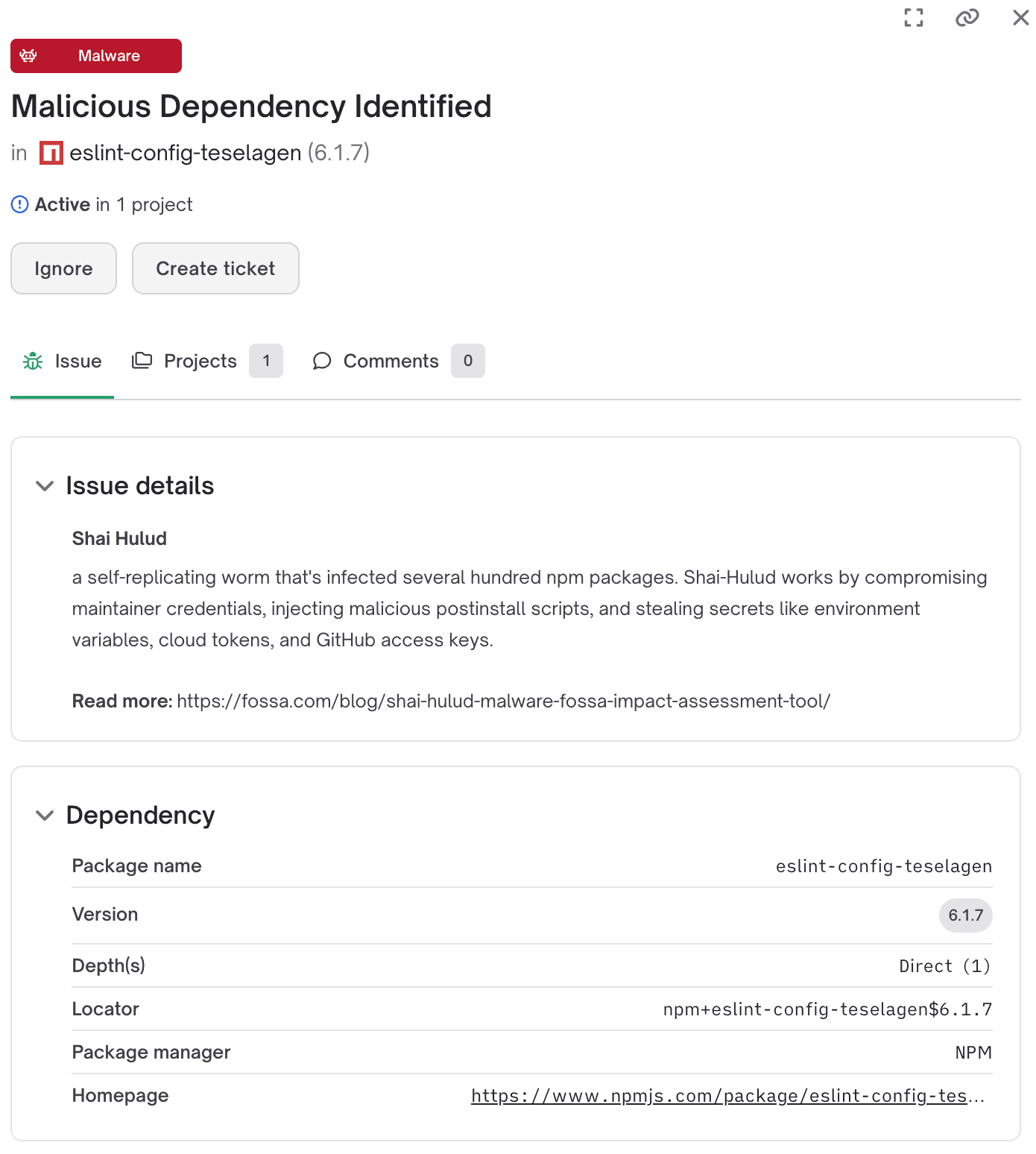
When you click into a specific malware issue (such as in the screenshot below), you’ll see relevant metadata, such as package version, depth, issue details, and more.
Get Started with FOSSA Malware Detection
FOSSA’s malware solution is included at no additional cost for our enterprise customers. As mentioned, it will automatically be turned on for our customers who have our Quality feature enabled. (This covers the majority of our customers.) If you don’t, you can easily turn the feature on by following the instructions in the previous section.
If you are an existing customer without Quality enabled and need assistance — or if you simply have questions about how to use the feature — please feel free to get in touch with your customer success contact.
If you are not a current FOSSA enterprise customer but have interest in trying our malware detection solution, we recommend that you schedule a demo with our experts.